


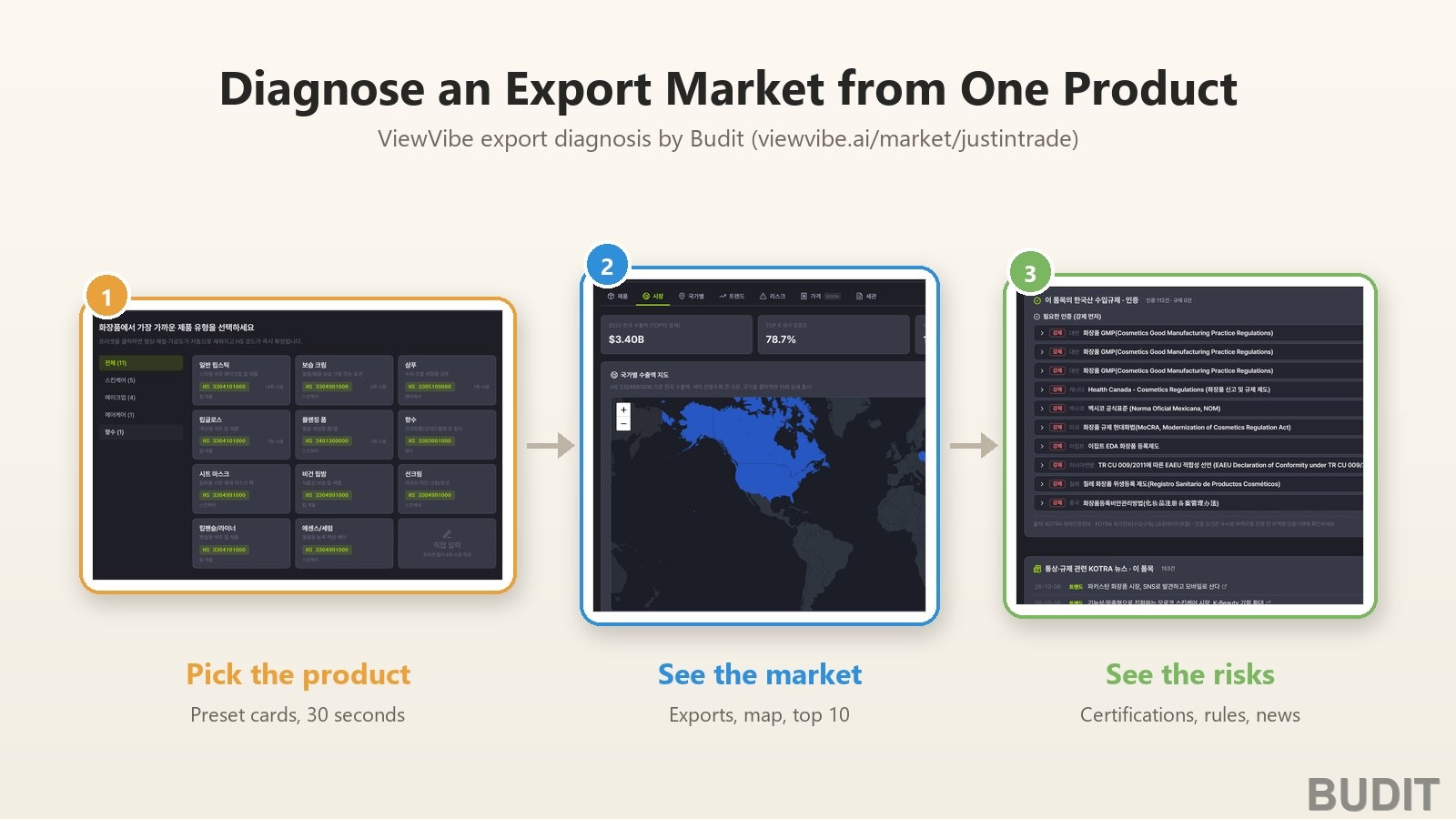
Diagnose an Export Market from One Product
Answering 『which country should we sell this in』 usually means separate trips to customs statistics, KOTRA reports, certification bodies and lists of companies already on the ground. 『ViewVibe』 export diagnosis brings the four together on one screen for a single product. No login is needed and the first result takes about thirty seconds. This article follows one sunscreen, registered under a fictional company, all the way through.
At a glance
| Item | Detail |
|---|---|
| What you enter | Company name, product category, product name. A business registration number is optional |
| How long | About thirty seconds to register. The first diagnosis screen takes seconds, and KOTRA recommendation scores about five seconds the first time |
| What you get | HS code fixed automatically, exports by country with a map, monthly trend, top ten destinations, KOTRA recommended markets, macro indicators and Korean companies on the ground per country, market news, certifications and regulations |
| Where the numbers come from | Korea Customs trade statistics, eleven KOTRA public datasets, the World Bank, the National Pension Service and the Financial Supervisory Service |
| Login | Diagnosis works as a guest. Only product and competitor research needs a login |
| Cost | Free |
| Address | viewvibe.ai/market/justintrade |
Why one screen matters
Public data is already open. The trouble starts after that. Korea Customs writes a country as a two letter code such as 『VN』, while KOTRA writes its Korean name. Customs classifies goods with a ten digit statutory code, while KOTRA news and certification data arrive anywhere between four and ten digits. Left alone, the same country and the same product look like different things.
Export diagnosis stands on top of that reconciliation work. What it took is told in our earlier article ViewVibe Named an Outstanding KOTRA Public Data Use Case. This article covers only how to use the result.
What to have ready
- A company name. A brand name is fine.
- What the product is. 『Sunscreen』 is enough, and you do not need to know the HS code.
- A ten digit business registration number. With it, company confirmation and financial research are added. Without it, the diagnosis still runs.
Step 1. Enter a company name
Open viewvibe.ai/market/justintrade and you see a brand name field and a business number field. Type the name and press start. It begins as a guest session and what you enter stays in the browser you are using.
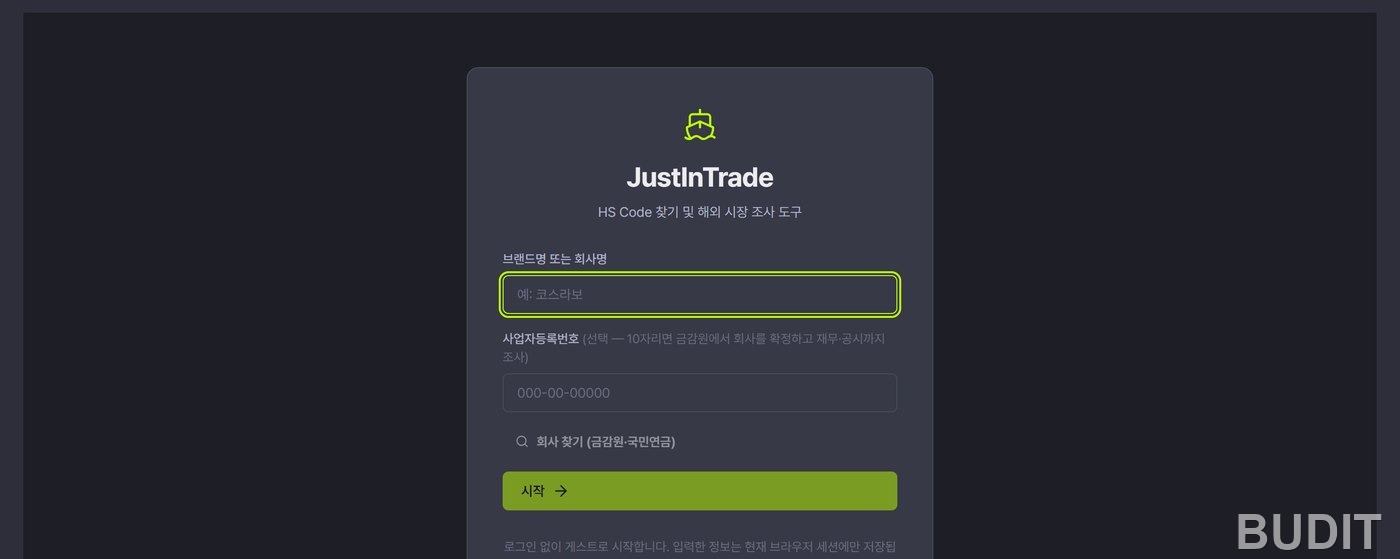
Photo: the 『ViewVibe』 export diagnosis start screen (as of Oct 7, 2026, dark mode, Korean interface). The three steps, company and product, automatic HS mapping, market diagnosis, are previewed below the form. Try it
The company screen opens next. The 『company situation』 card at the top gathers National Pension Service workplace records, the Financial Supervisory Service company overview, the Fair Trade Commission, DART and the KOTRA directory of Korean companies abroad to summarise size, industry, location and overseas history. 『Run company research』 is free and takes about thirty seconds. Adding a business registration number extends it to financials and filings. Companies are confirmed by number rather than name so that a namesake does not get attached by mistake.
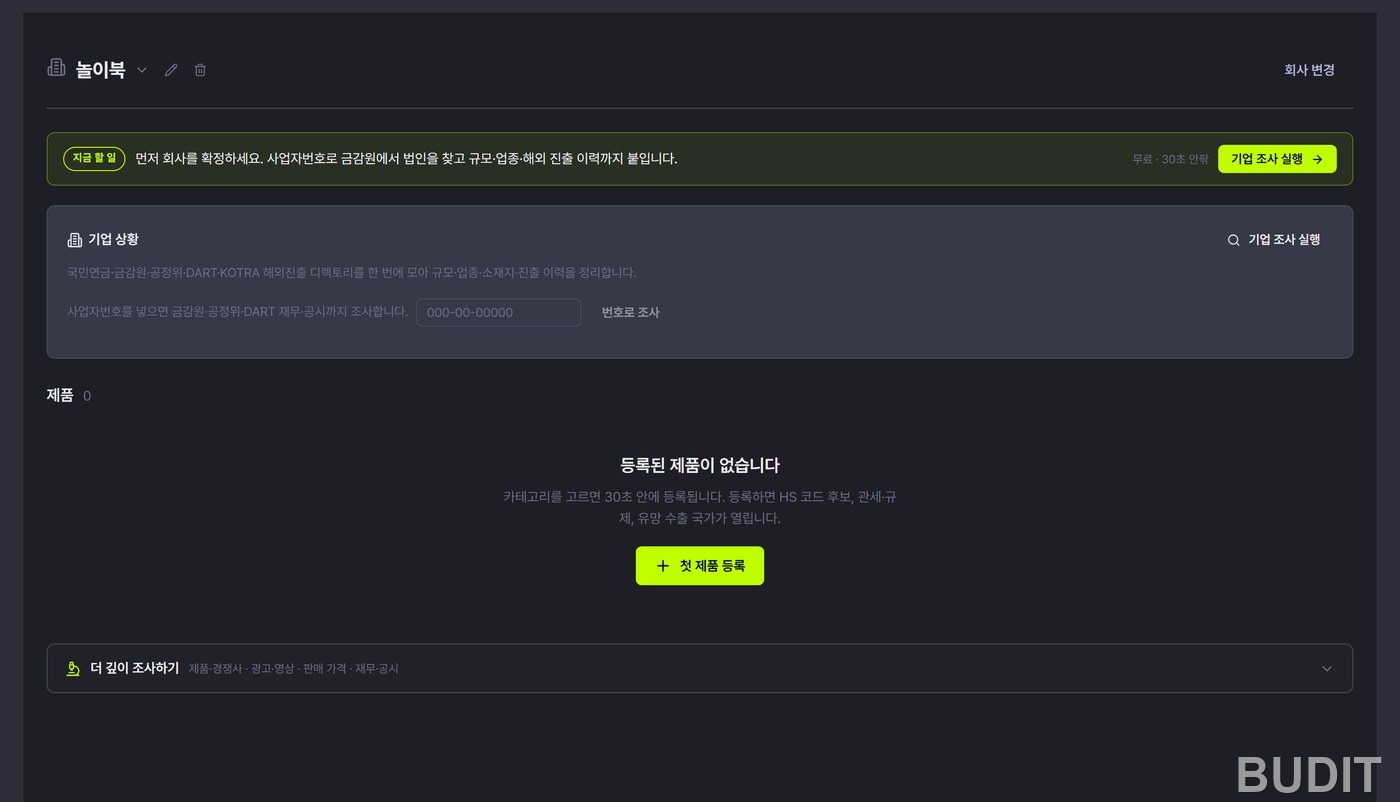
Photo: the company screen. A 『to do now』 bar suggests confirming the company first, and 『Register your first product』 sits below. The 『Dig deeper』 menu at the bottom folds away product and competitor, ads and video, pricing, and financials research.
Step 2. Register a product
『Register your first product』 opens a three step dialog: category, preset, product name.
There are six categories. Cosmetics (7 subcategories), food (8), fashion (5), IT and electronics (6), household goods (5) and other (5).
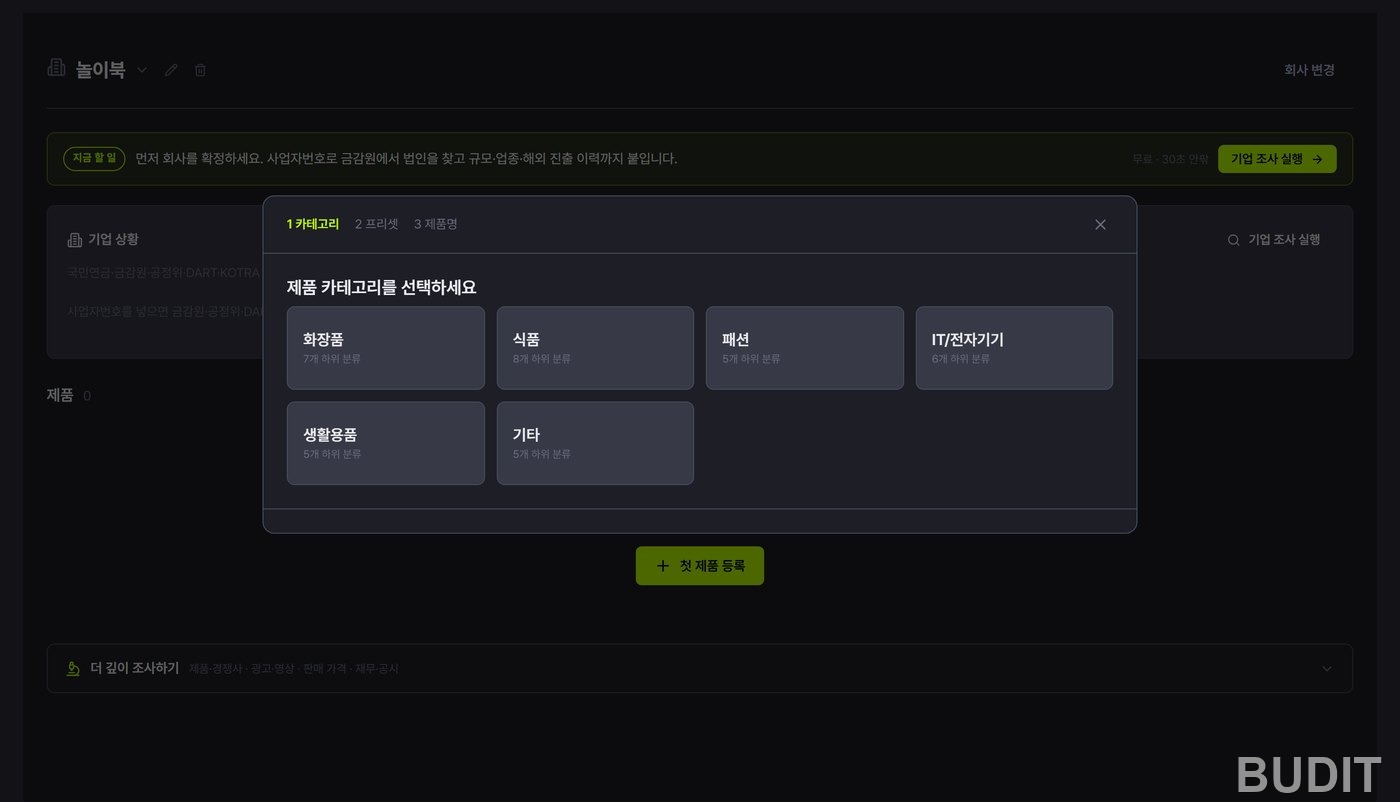
Photo: choosing a category. Pick one and its preset cards appear.
Cosmetics shows eleven preset cards: lipstick, moisturizer, shampoo, lip gloss, cleansing foam, perfume, sheet mask, vegan lip balm, sunscreen, lip pencil and essence. Each card already carries its HS code, so you only pick, and a small note shows how often other users chose it. Products not in the presets go in through 『direct entry』, where you set four attributes by hand.
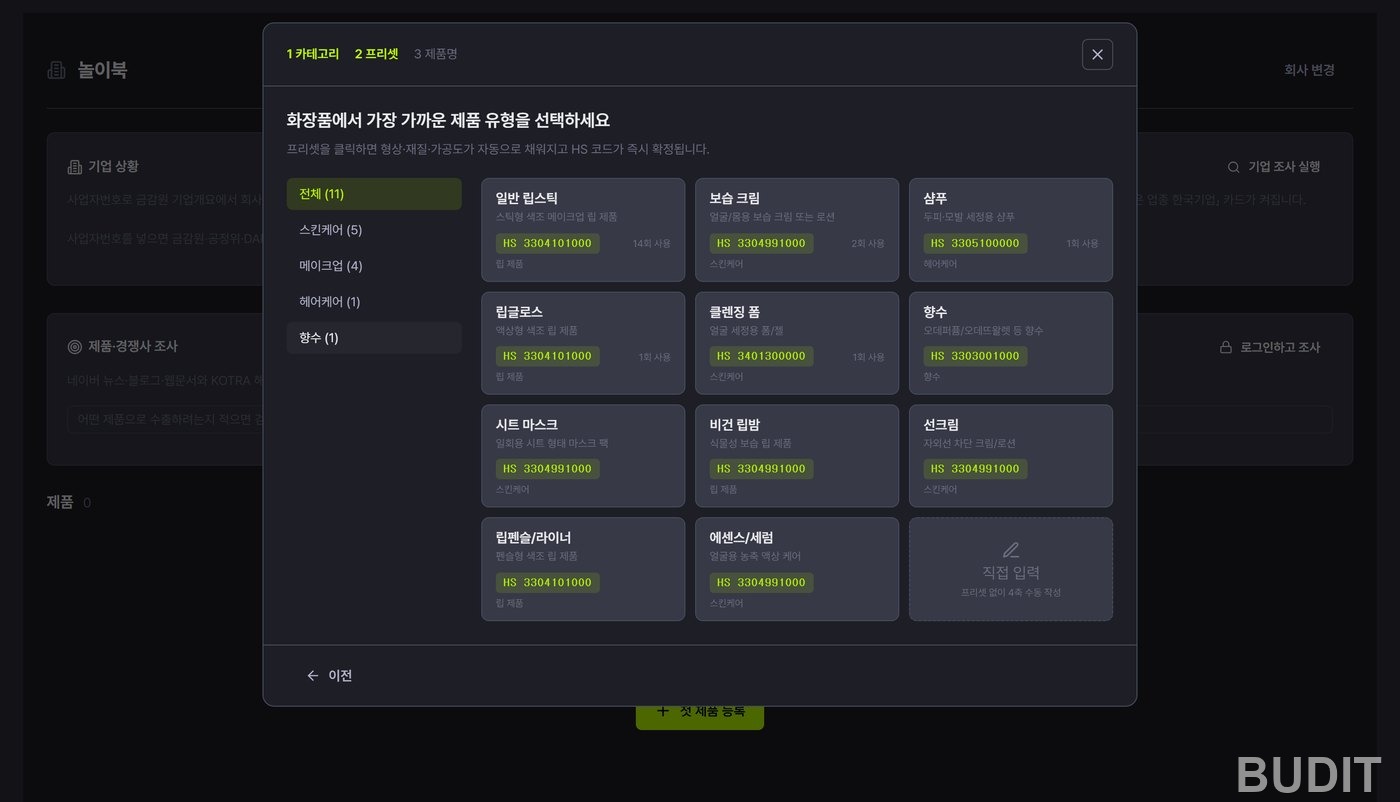
Photo: cosmetics presets. The left column filters by skincare, makeup, hair care and perfume.
Pick the sunscreen card and a product name field appears, with 『HS 3304991000 fixed automatically』 beneath it. Four attributes are prefilled and editable: main function (UV protection), form (cream or lotion), main ingredient (synthetic) and processing (finished product). These four axes follow the World Customs Organization classification, which is what you lean on if the HS code ever needs changing.
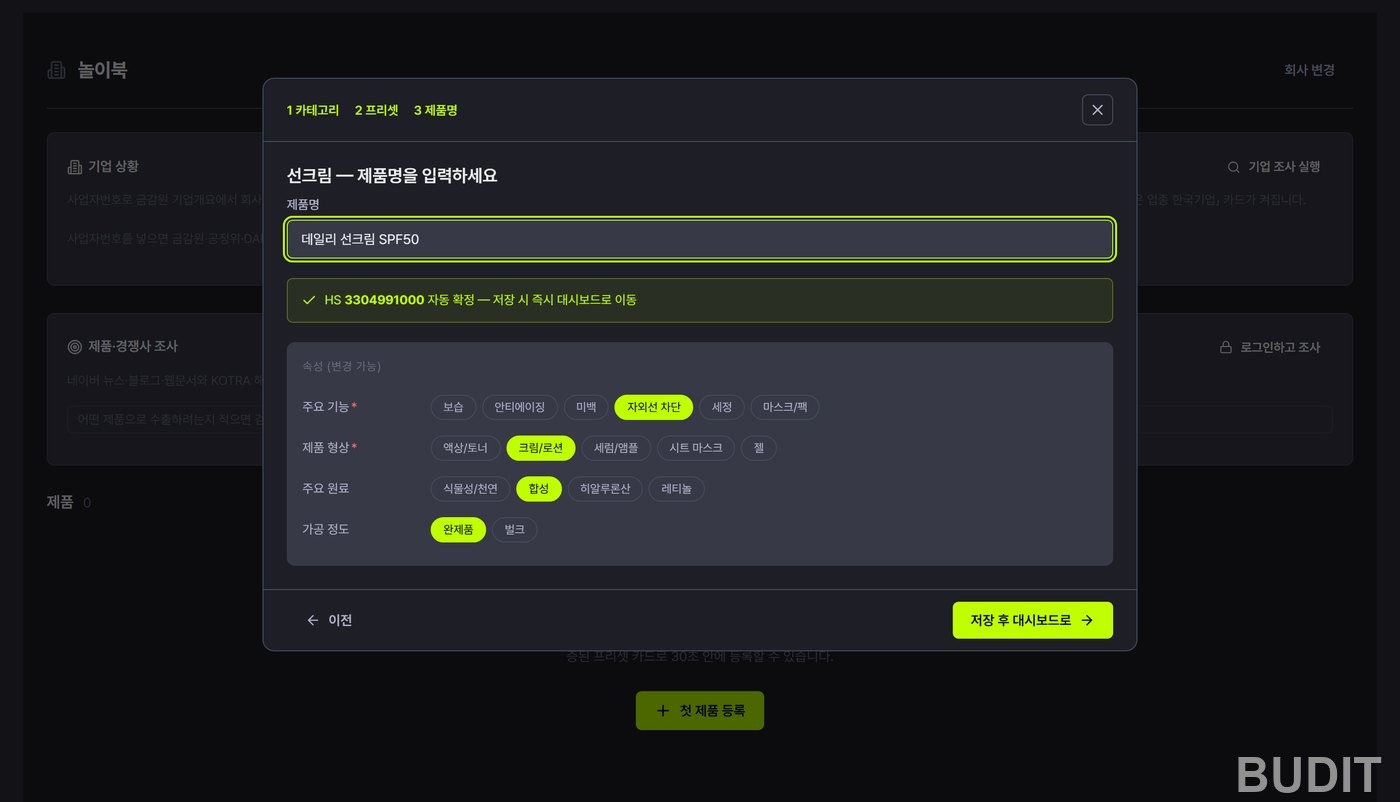
Photo: the product name step. 『Save and go to dashboard』 opens the diagnosis straight away. Thirty seconds is enough to get here.
Step 3. Read the diagnosis
The diagnosis has seven tabs: Product, Market, By country, Trends, Risks, Price and Customs. Price is still in preparation. Below is what to look for on each tab, using the sunscreen as the example. Every figure is exactly what the screen showed on Oct 7, 2026.
Product tab
The product name, category and fixed HS code. A note reads 『Korea Customs standard ten digit classification. This code applies at clearance』, with a 『Change code』 button for use after talking to customs or a broker. Below it the four axes read form cream, function uv_protect, material synthetic, processing finished. Top ten peer products and the market price distribution are marked as in preparation.
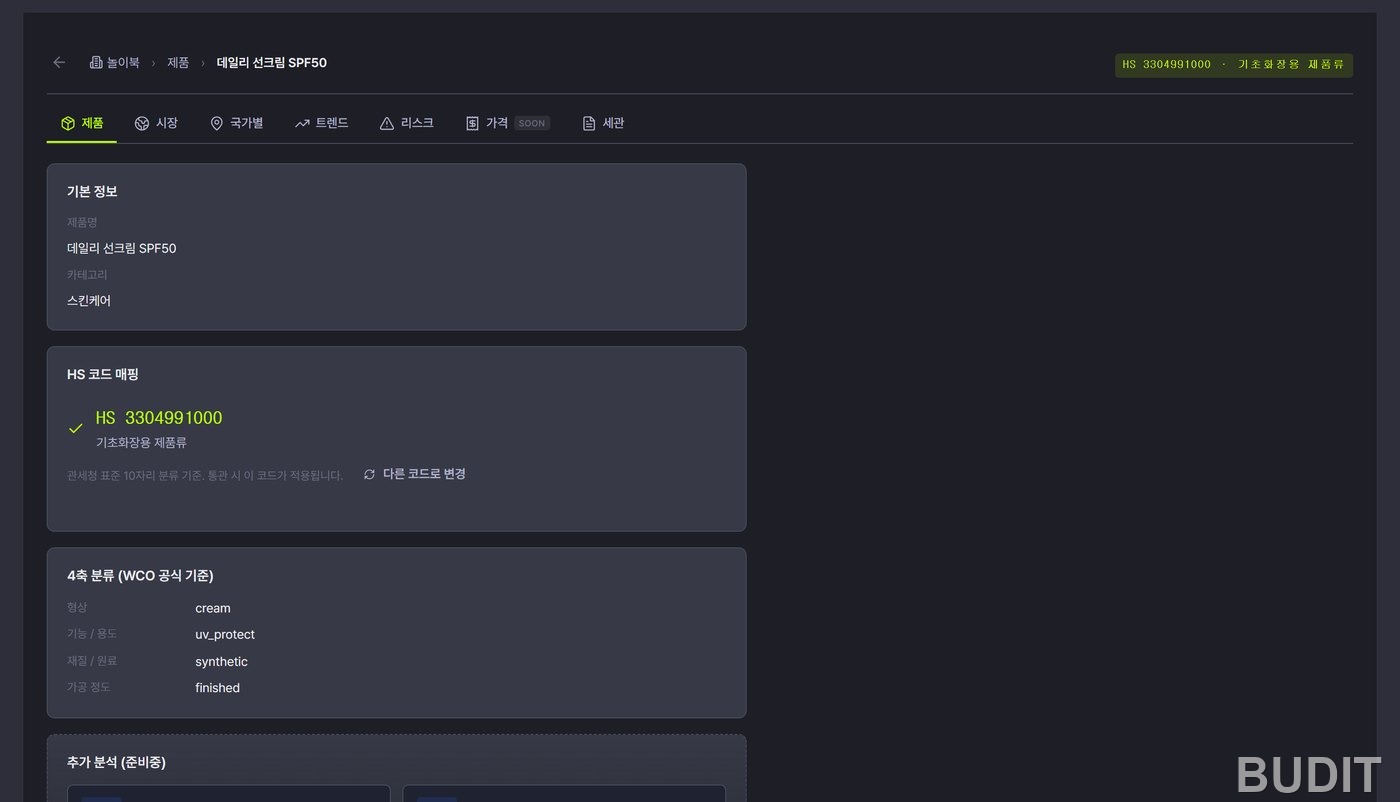
Photo: the Product tab. This is where you confirm what the HS code was based on and that it can be changed.
Market tab
The four summary cards at the top are the heart of it.
- Korea's 2025 exports (top ten destinations combined): 3.40 billion dollars.
- Top five concentration: 78.7%. Five countries take about four fifths of the ten country total, and the higher this number, the more the big markets are already crowded.
- Destinations: 10 plus.
- HS code: 3304991000.
The map below shades countries by export value, and clicking one leads into the By country tab.
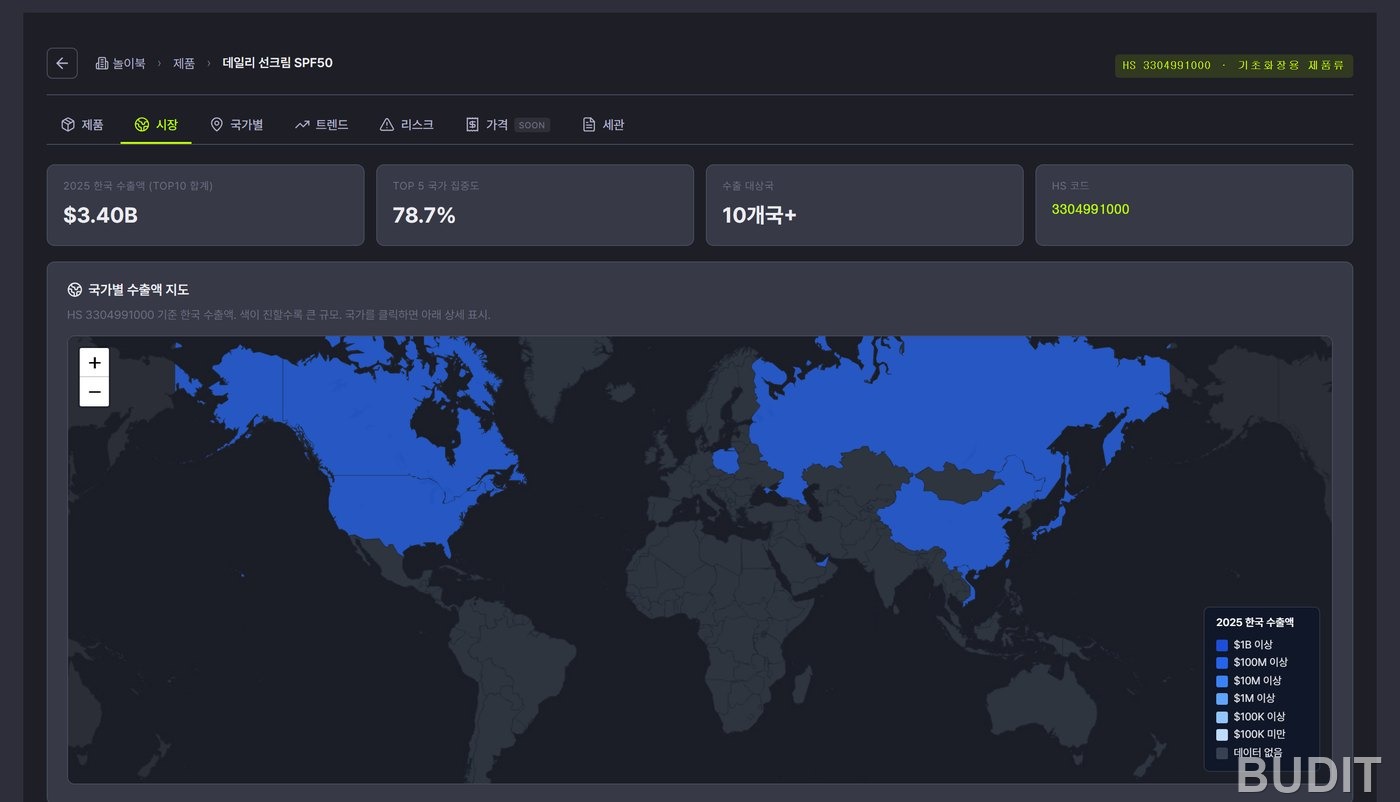
Photo: the top of the Market tab. Four summary numbers and a map of exports by country.
Scrolling down gives the monthly export and import trend from January 2020 to August 2026. Sunscreen shows a spring rise every year, which helps when timing buyer meetings. Beside it are the 2025 top ten: the United States at 899.1 million dollars (26.5%), China at 871.3 million (25.6%), Hong Kong at 415.0 million (12.2%), Japan at 292.7 million (8.6%) and Russia at 194.4 million (5.7%), followed by Poland, the United Arab Emirates, Vietnam, Taiwan and Canada.
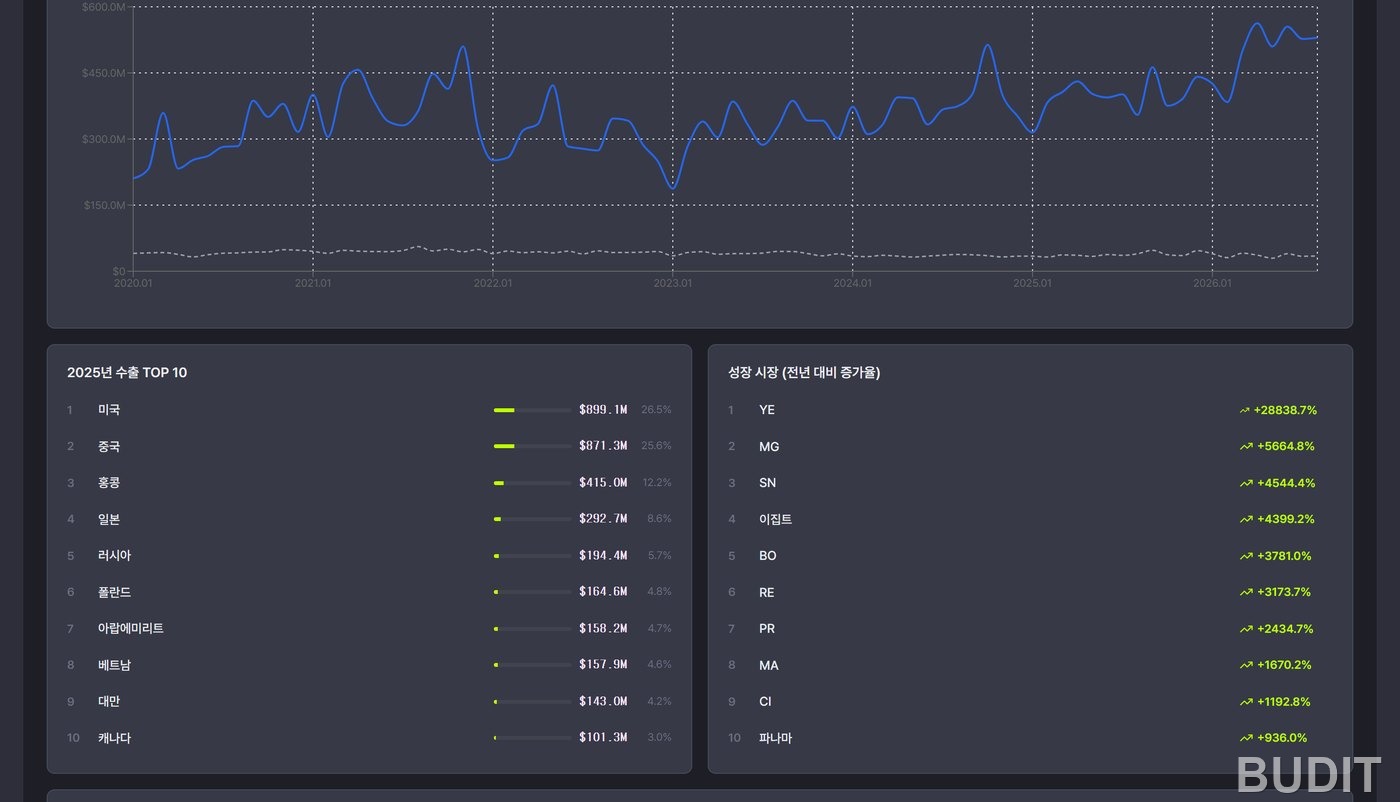
Photo: the middle of the Market tab. Monthly trend, top ten destinations and the fastest growing markets by year on year change. Growth markets tend to be countries with a small base, so treat them as reference only.
Further down, 『other items in the same HS class』 lists comparison candidates, and below that sits 『KOTRA recommended export markets』. This table is at the six digit level (3304.99), so its export values are larger than the ten digit figures above. The date KOTRA scored the markets (June 26, 2025) is shown, and choosing your company's stage among five, domestic, beginner, promising, growing and leading, changes the recommendation.
For sunscreen at the beginner stage the scores run United States 15.6, Japan 12.1, Vietnam 11.0, China 10.3, Singapore 9.6, Hong Kong 9.5, Taiwan 9.3, Malaysia 9.2 and Thailand 8.5. The order differs from the export ranking, and that is the point. Vietnam is eighth by exports but third by KOTRA score, and Singapore, Malaysia and Thailand sit outside the export top ten yet rank high. Export value answers 『who buys the most now』. The KOTRA score answers 『where does a first time exporter fit』.
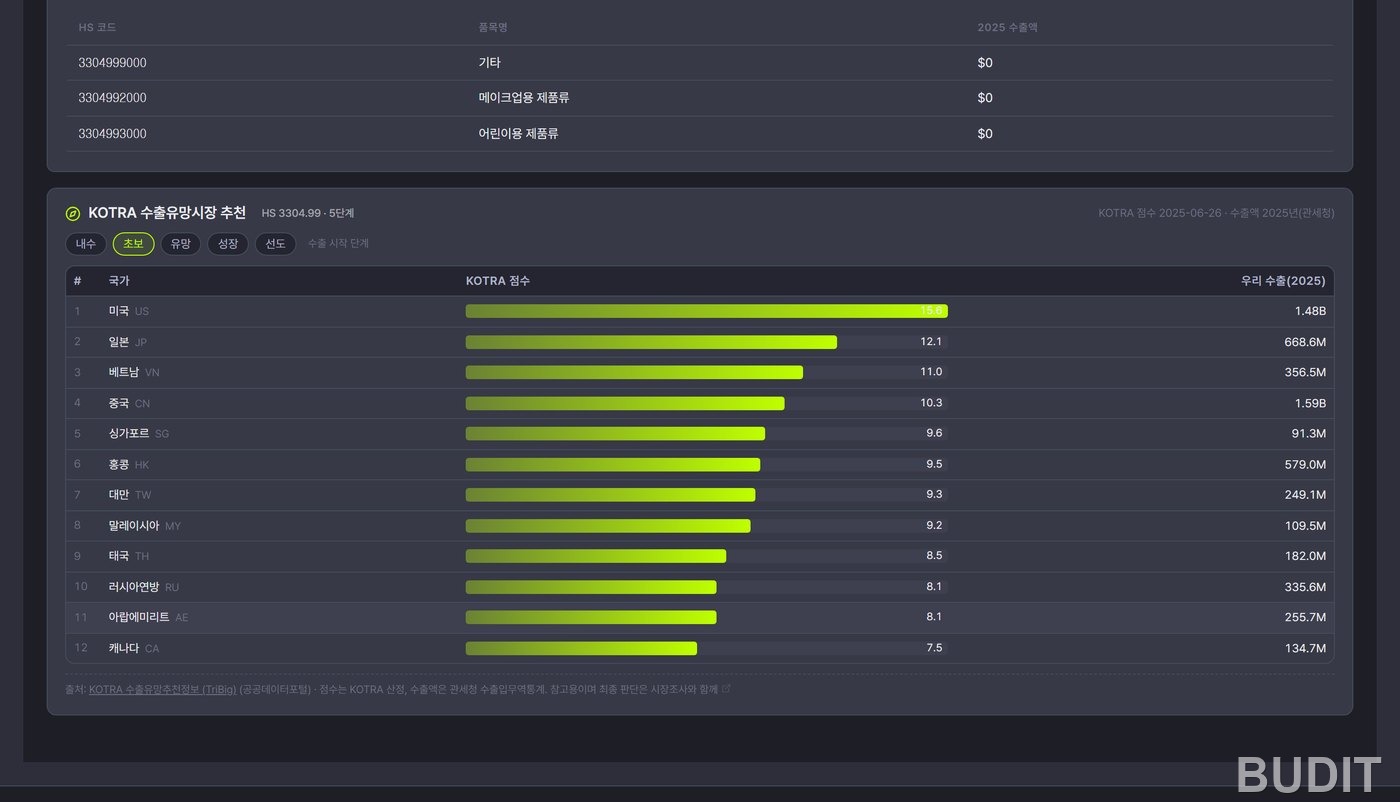
Photo: KOTRA recommended export markets. The scores are KOTRA's and the export values are from Korea Customs. The footer reads 『for reference, to be weighed together with market research』.
By country tab
The top ten reappear on the left, and clicking a country unfolds its detail on the right in three parts.
- World Bank macro indicators: population, GDP, GDP per capita, exports and imports as a share of GDP, and the exchange rate, with 2024 values and trends from 2019.
- Korea's exports of this item to that country and its share.
- The KOTRA directory of Korean companies abroad: how many Korean companies are in that country, biennially from 2012 to 2024, broken down by industry and searchable by name.
Click the United States and you get population 340 million, GDP 28.75 trillion dollars, GDP per capita 84,534 dollars, Korea's sunscreen exports to the United States of 899.1 million dollars (26.5%), and 933 Korean companies there in 2024.
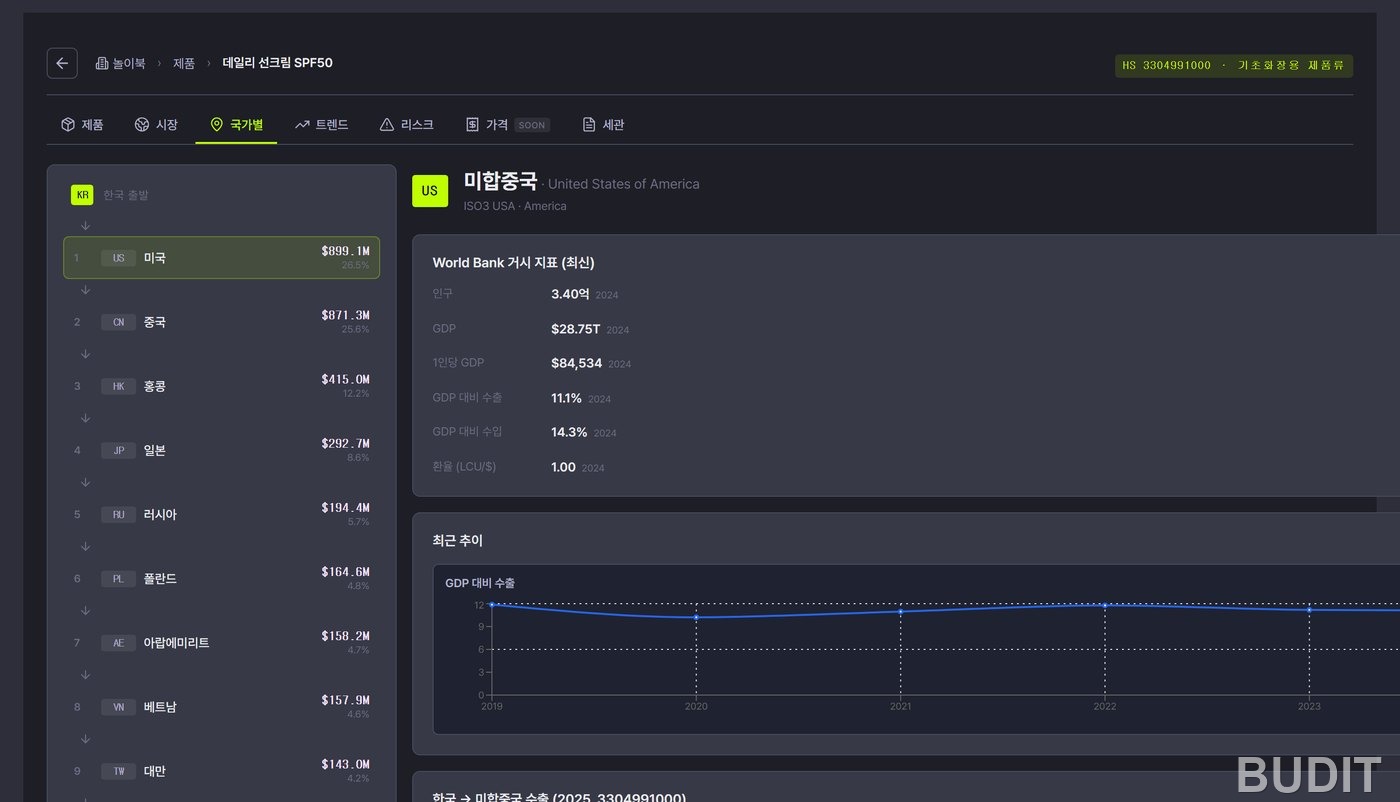
Photo: the By country tab with the United States selected. Below the macro indicators come exports to that country and the number of Korean companies there.
Click China and you get population 1.409 billion, GDP 18.74 trillion dollars and GDP per capita 13,303 dollars. The directory shows 2,397 Korean companies in 2024, down steadily from 3,935 in 2012, a trend visible in the year buttons. Manufacturing leads the industry breakdown, followed by wholesale and retail, then professional, scientific and technical services. Corporations and branches are marked separately, and the industry buttons filter the list to find candidate local partners.
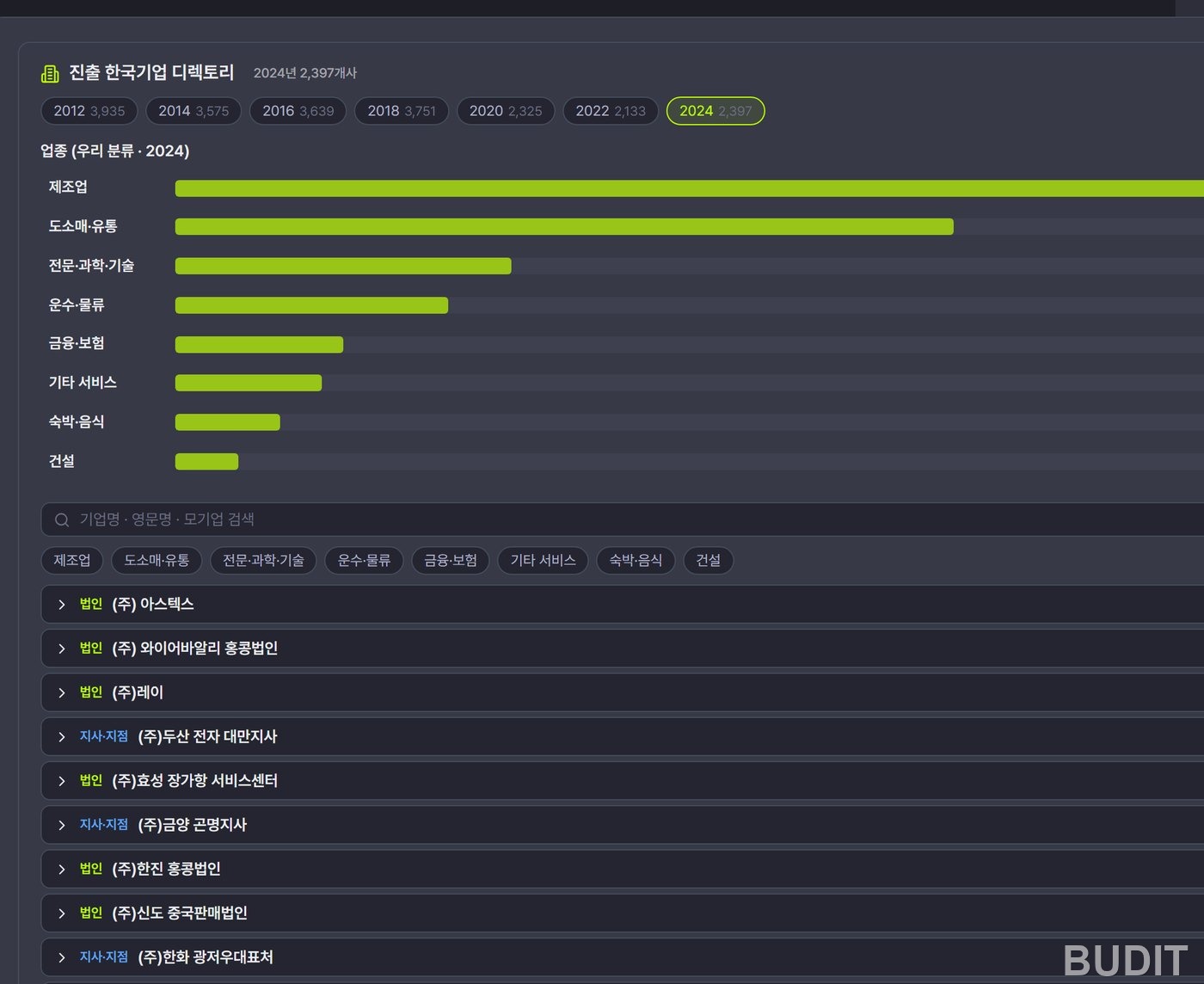
Photo: the directory section after selecting China on the By country tab. Pressing a year button switches to that year's list.
Trends tab
KOTRA overseas market news and product reports related to HS 3304 number 334 over the last three years, listed by date, type, title and country. Clicking a title opens the KOTRA source. The body text is not pulled in, only titles and links. In early October the top items included a China sun care market report, one on Mexico's shift from seasonal to daily sun care, and one on K beauty growing on Amazon. KOTRA reports and flash news sit in a separate block below.
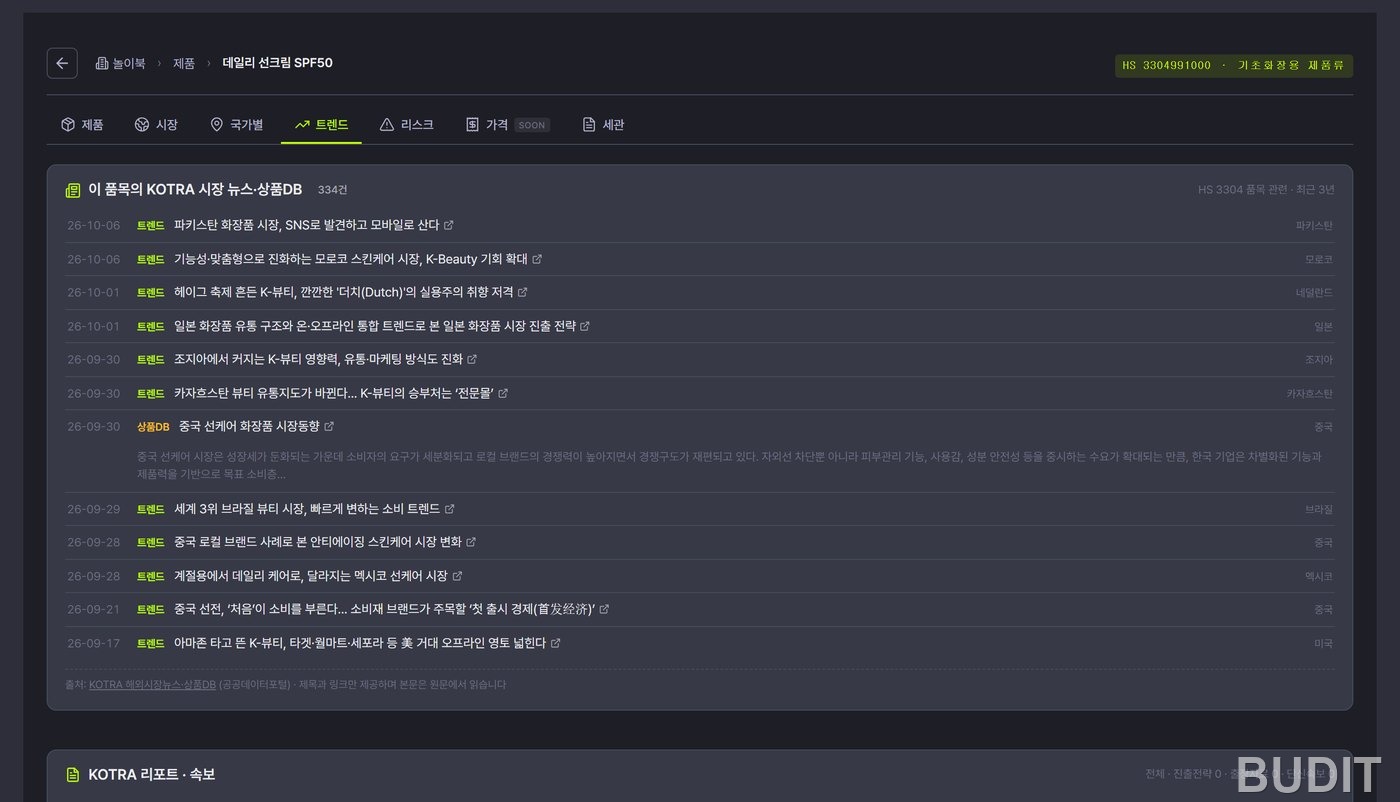
Photo: the Trends tab. Use it to scan the recent mood in each country.
Risks tab
Korean cosmetics face 112 certification requirements and 0 import restrictions. Mandatory ones come first: Taiwan's cosmetics GMP, Health Canada's cosmetics regulations, Mexico's NOM standard, the United States MoCRA, Egypt's EDA registration, Russia's EAEU declaration of conformity, Chile's sanitary registration and China's cosmetics registration and filing rules. 153 KOTRA news items on trade and regulation from the last two years are attached below.
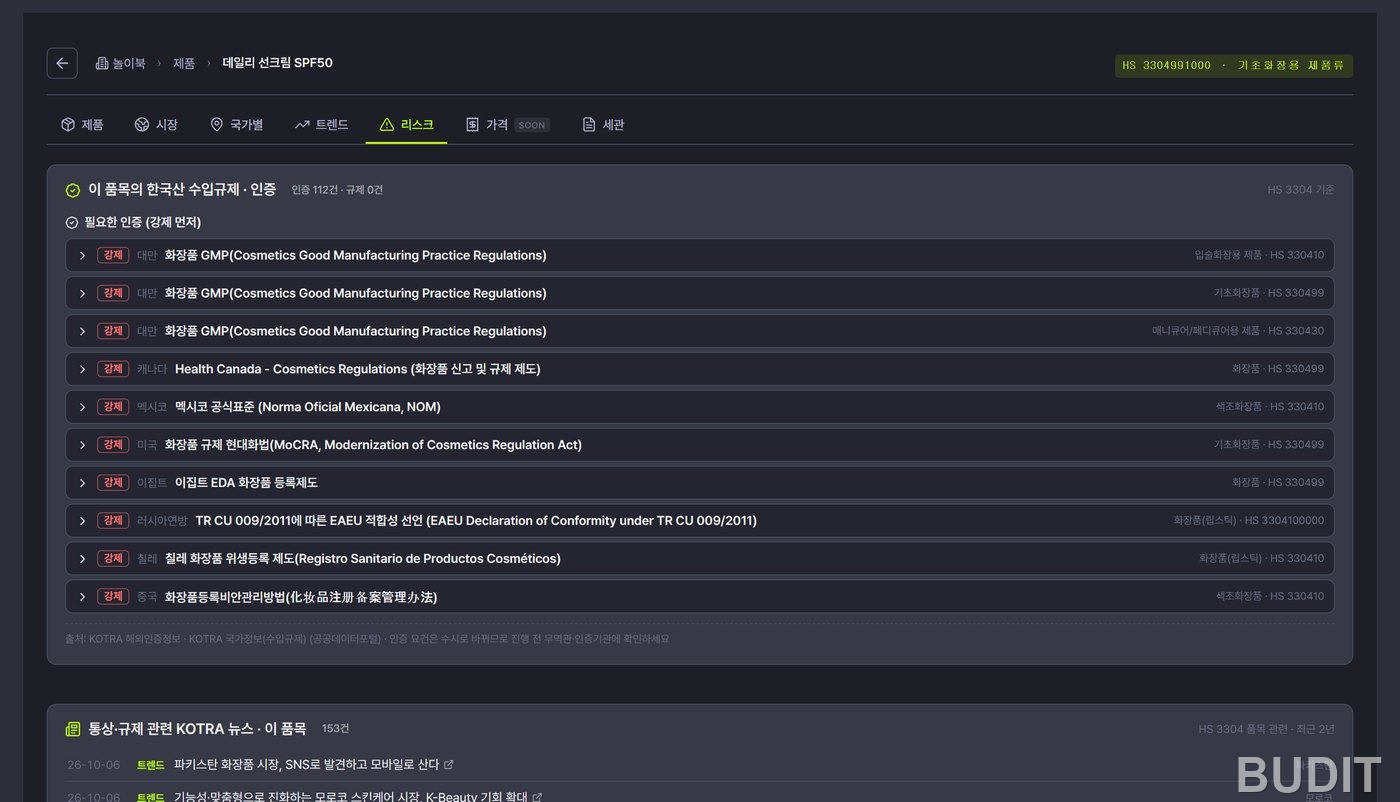
Photo: the Risks tab. Start with the items marked mandatory.
Customs tab
The same certification requirements regrouped as export requirements by country. The list is long. Scrolling reveals Japan's PMDA foreign manufacturer registration, Vietnam's cosmetics registration, Bangladesh's BSTI import clearance certificate, Indonesia's BPOM certification, Thailand's FDA notification of controlled cosmetics, the United Arab Emirates ECAS, Kazakhstan's EAC and Jordan's JFDA registration. Each item expands to its details, and the footer reads 『certification requirements change often, so confirm with a KOTRA trade office or certification body before proceeding』.
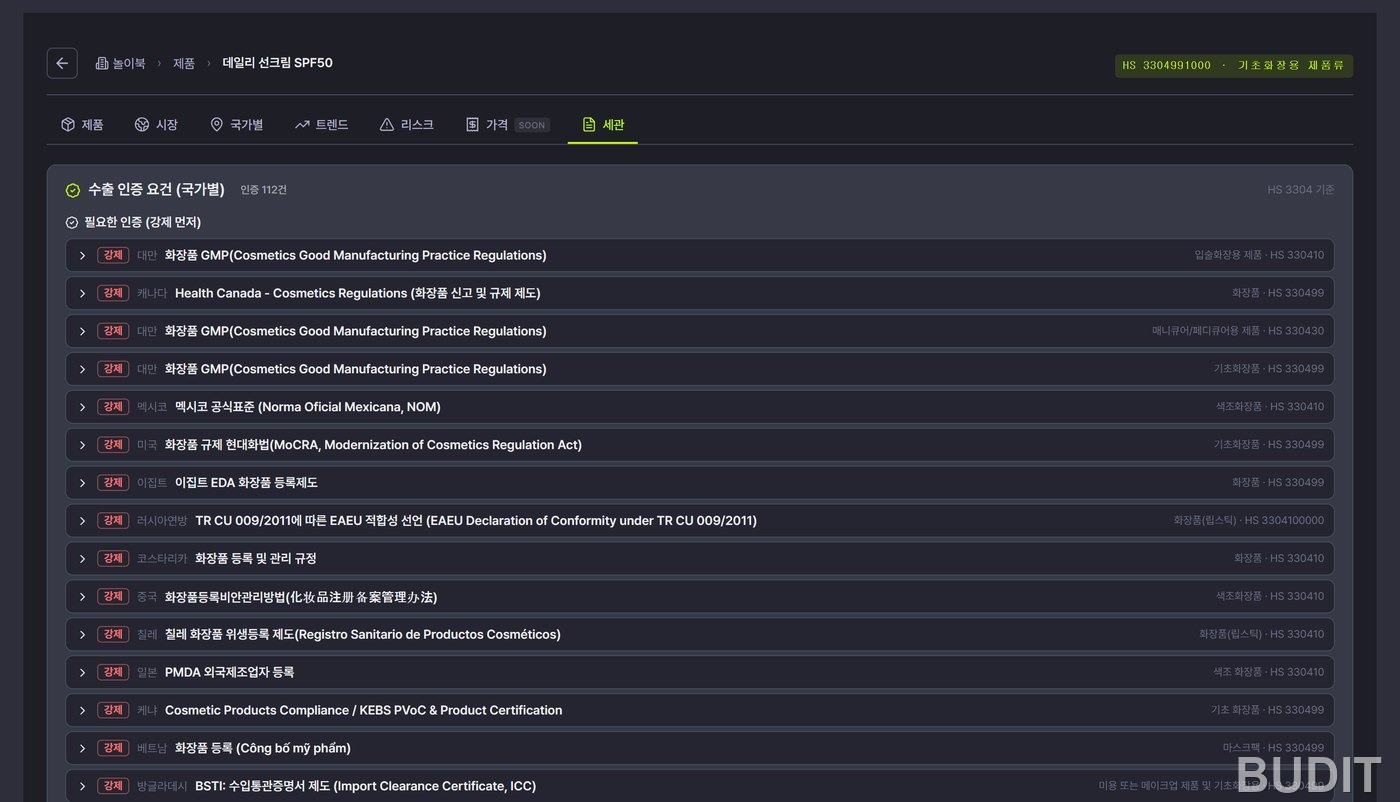
Photo: the top of the Customs tab. The same data as the Risks tab, viewed as requirements by country.
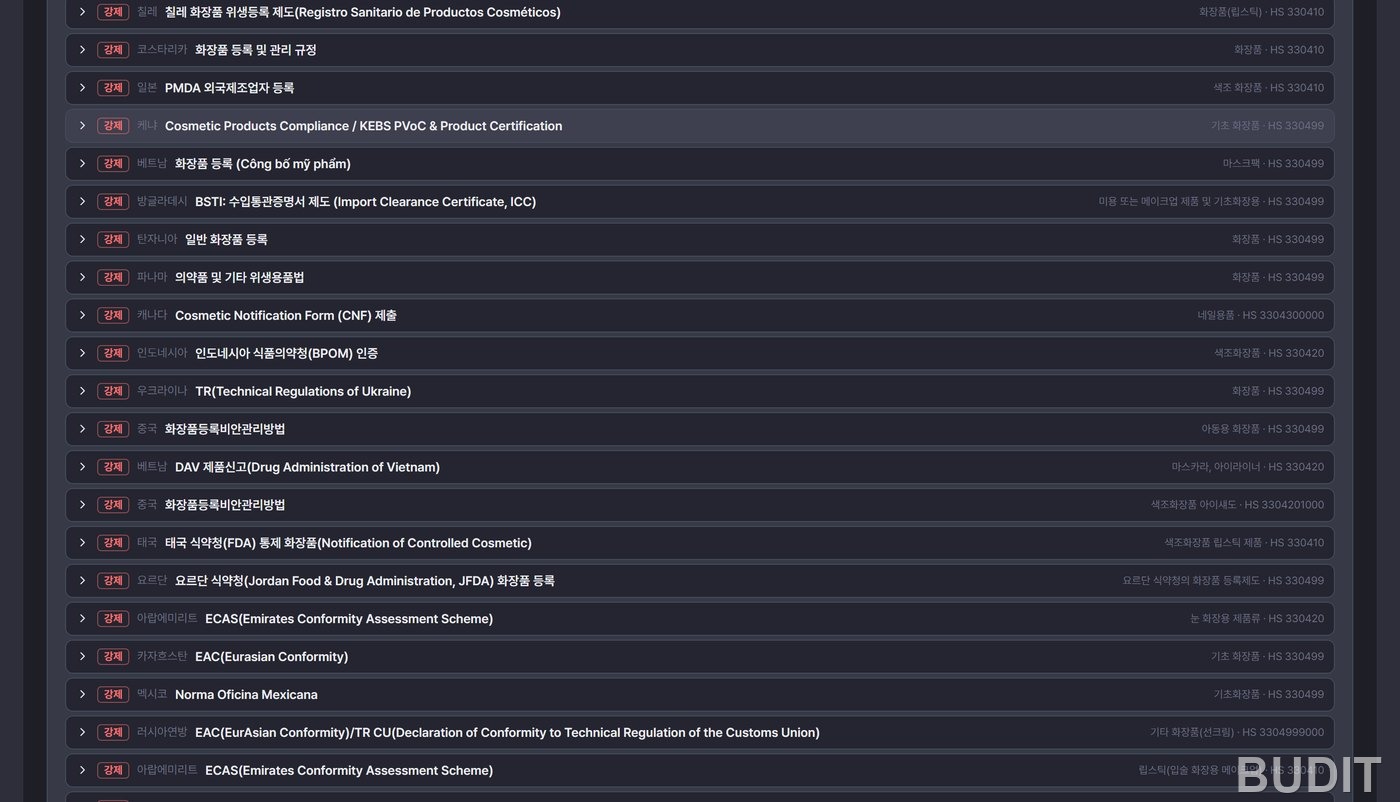
Photo: further down the Customs tab. Southeast Asian, Middle Eastern and Central Asian requirements sit in one list.
Reading it for sunscreen
After the tabs, what remains is 『so where do we start』. Here is how we would read it.
- Export value measures the size of the competition. The United States, China, Hong Kong, Japan and Russia take 78.7% of the ten country total. Many Korean brands are already there, so for a first time exporter the biggest market is not the easiest one.
- Look for countries with a high KOTRA score and middling exports. Vietnam (third by score, eighth by exports), Singapore, Malaysia and Thailand fall here. These are the markets KOTRA judges a beginner can enter.
- Check the mandatory certifications for those candidates on the Customs tab. Vietnam requires cosmetics registration, Thailand an FDA notification of controlled cosmetics, Indonesia BPOM certification. Cost and lead time diverge here.
- Read the recent news for each candidate on the Trends tab. For sun care, a shift 『from seasonal to daily care』 feeds straight into product planning.
- Find companies in the same industry in the By country directory. Knowing who went in first gives you someone to ask about distribution and certification.
Followed in this order, one sunscreen yields 『which country first, which certification first, and whom to ask』 within an hour.
Where the numbers come from
Every value on the screen keeps a record of which institution's data it came from.
- Trade statistics: Korea Customs trade statistics, January 2020 to August 2026, 10.37 million rows.
- HS codes: verified against the Korea Customs HS master of 13,205 items. AI generated candidates are for reference only, and codes absent from the master are never used.
- Recommended markets: KOTRA export opportunity recommendations. The scores are KOTRA's and the export values are from Korea Customs.
- News and product reports: KOTRA overseas market news and product database. Titles and links only, with the full text read at the source.
- Certifications and regulations: KOTRA overseas certification information and country information.
- Companies abroad: the KOTRA directory of Korean companies abroad, seven biennial editions from 2012 to 2024, 77,641 rows.
- Macro indicators: the World Bank.
- Company confirmation: National Pension Service workplace records and Financial Supervisory Service company overviews, extended to the Fair Trade Commission and DART when a business number is given.
Good to know
- As a guest, the company and products you enter stay in this browser only. Continuing on another device needs a login.
- Certification requirements change often. The screen itself says to confirm with a KOTRA trade office or certification body before proceeding. The diagnosis is a starting point, and the final call belongs with proper market research.
- Export values on the Market tab are at the ten digit HS level, while the KOTRA recommendation table uses six digits, so the same country shows different figures. Do not compare across the two.
- The growth markets block ranks by year on year change, which pushes countries with a tiny base to the top. Reference only.
- The Price tab is still in preparation.
- Product and competitor research opens after login. It gathers a company's products, competitors and overseas market situation from Naver news and blogs and KOTRA market news.
Who it fits
- A small or medium exporter preparing a first shipment and not yet sure which country to look at first. Set the stage button in the KOTRA table to 『beginner』.
- Anyone about to meet a buyer or attend a trade show who wants the destination's certification requirements checked beforehand. Search the Customs tab by country name.
- Anyone writing an export support application that needs market size and sourced evidence. The sources appear alongside, ready to cite.
- Anyone looking for a local partner or a company that went before. Filter the By country directory by industry.
Open export diagnosis · See all ViewVibe services · Contact Budit
Screens and figures are as of Oct 7, 2026. Statistics refresh monthly and features may change.